How to calculate the Fire Weather Index in Indonesia
FWI Excel program add-in is a quick and easy way to calculate the fire weather index into a table in Microsoft Excel, hereinafter known as XLFWI add-ins. XLFWI add-in consists of functions worksheets for six index of fire weather index (FFMC, DMC, DC, BUI, ISI and FWI). Besides the function of this worksheet can be applied directly into the weather data that is stored in Microsoft Excel.
Calculation system is designed to easily and quickly used by the user, or can also be modified in accordance with the application. XLFWI add-ins can be used for operational calculations FWI index on a single weather station, as FWI and training systems can be combined with other manufacturing excel display, such as charts and basic data analysis.
Download FWI Excel add-in here.
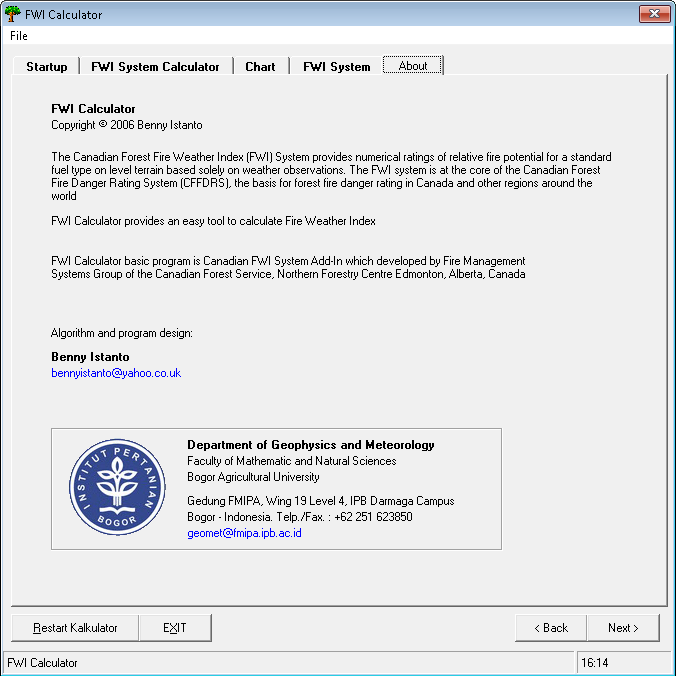
In addition to the Excel add-ins, as part of my final research project I developed a program that can run directly to calculate the FWI. The program is written in BASIC language, and some components have been adjusted for the FWI calculations in Indonesia.
Download FWI Calculator here (32-bit Windows program)
The six indices
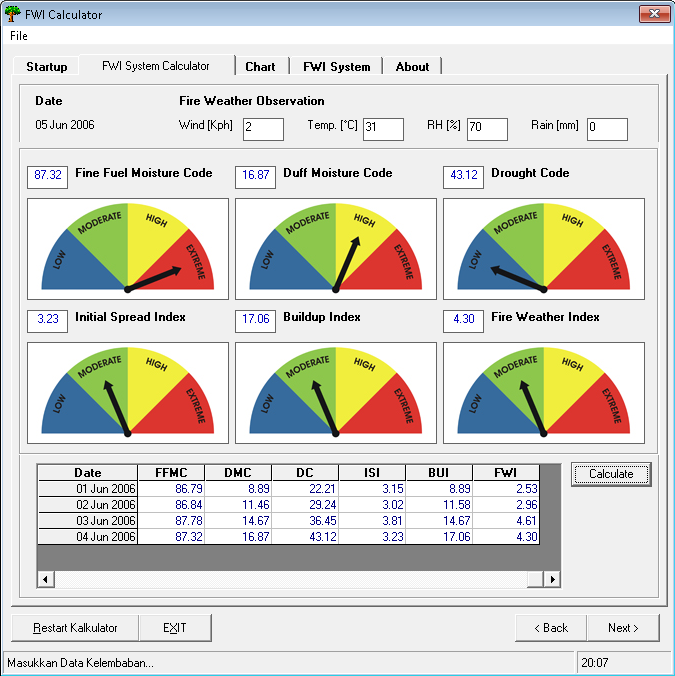
The calculator works through the Canadian Forest Fire Weather Index system in order. The three fuel moisture codes come first, each carrying yesterday’s value forward:
- FFMC (Fine Fuel Moisture Code) from temperature, humidity, wind and rain
- DMC (Duff Moisture Code) from temperature, humidity, rain and day length
- DC (Drought Code) from temperature, rain and a seasonal drying factor
Those feed the three fire behaviour indices: ISI from FFMC and wind, BUI from DMC and DC, and finally FWI from ISI and BUI. The day-length and drying-factor terms are the parts adjusted for Indonesia, since the original Canadian values assume a temperate seasonal cycle.
Starting values
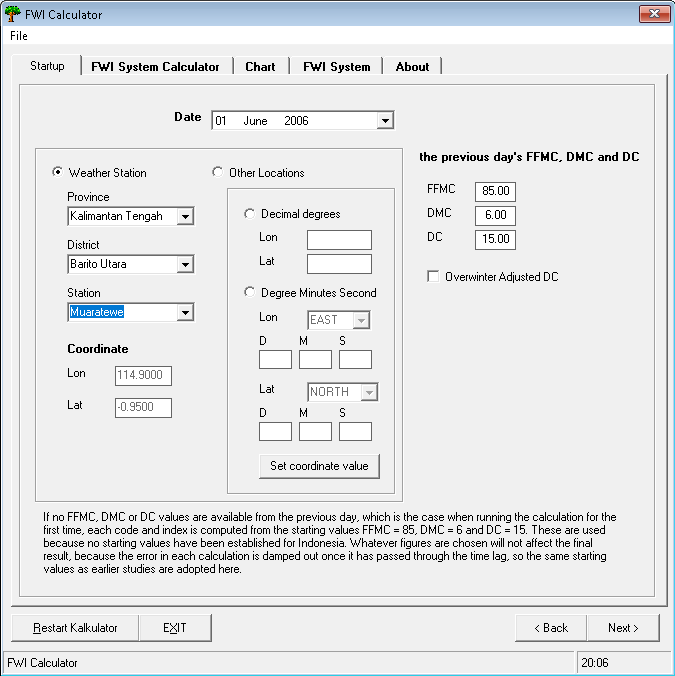
FFMC, DMC and DC are running values: each day’s calculation needs yesterday’s result. If no FFMC, DMC or DC values are available from the previous day, which is the case when running the calculation for the first time, each code and index is computed from the starting values FFMC = 85, DMC = 6 and DC = 15.
These are used because no starting values have been established for Indonesia. Whatever figures are chosen will not affect the final result, because the error in each calculation is damped out once it has passed through the time lag, so the same starting values as earlier studies are adopted here.
The calculator applies this automatically. The first calculation at a location is seeded with 85, 6 and 15; after that, each result is carried into the next day, and picking a different station starts a fresh sequence.
Charting the results
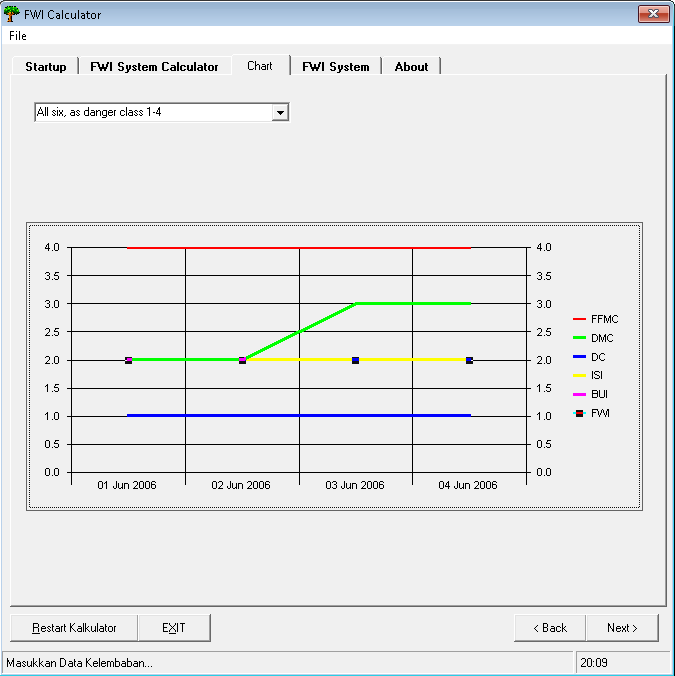
The six indices look like they belong on one chart, but they do not share a scale. FFMC is a moisture code bounded near 101, DC is an open-ended drought accumulator that can pass 800, and ISI usually sits below 20. Drawn on a single axis, DC dominates and the other five collapse into a line along the bottom.
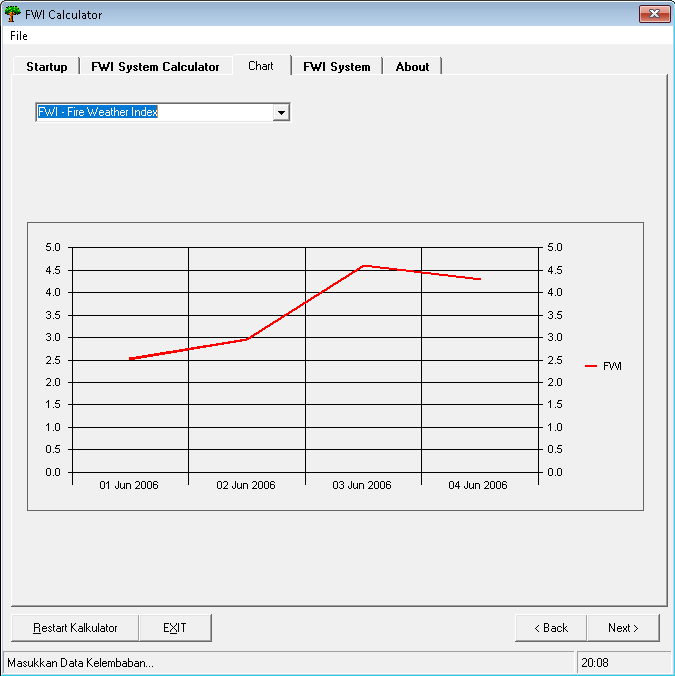
So the chart shows one index at a time at full resolution, picked from a combo box, with one extra option that plots all six as their danger class 1 to 4 - the only form in which they are directly comparable, and the same scale the indicator lamps use.
The results grid is the store; the chart is only a view of it, redrawn after every calculation. On the Chart tab that needs two controls: the MSChart itself, named chrtFDRS, and a combo box named cboChart for the series picker.
The source below is in two parts, and they go in two different places in the VB6 project:
| Part | Goes in | Name |
|---|---|---|
| The six index calculations | a standard module | modFWI (modFWI.bas) |
| Form, station database, indicators | the form’s code window | frmNumeric |
The module holds only pure functions, so it has no state of its own. Everything that has to be remembered between clicks (the station table, and the running FFMC, DMC and DC values) lives in the form.
'+++++++++++++++++++++++++++++++++++++++++++++++++++++++++++++++++
'  FWI Calculator - index calculations
'
'  Canadian Forest Fire Weather Index system, with the day-length
'  and drying-factor terms adjusted for Indonesia.
'
'  Benny Istanto
'  Departemen Geofisika dan Meteorologi, FMIPA
'  Institut Pertanian Bogor
'
'  WHERE THIS GOES
'    Project > Add Module > Module > Open, then in the Properties
'    window set (Name) to  modFWI  and save it as  modFWI.bas
'
'  Every routine here is a pure function: give it the weather and
'  yesterday's code, it returns today's. It holds no state of its own,
'  so the form owns all the running values.
'+++++++++++++++++++++++++++++++++++++++++++++++++++++++++++++++++

Option Explicit

Private Const PI As Double = 3.14159265358979

' Day-length adjustment factor for the Drought Code, by month. These are the
' original hardcoded Canadian values, kept as-is. The Duff Moisture Code no
' longer uses a lookup like this: see DayLength() below.
Private Const LF_NORTH As String = "1.17,1.2,4.5,2.99,2.27,2.45,4.13,4.4,5.3,5.17,3.12,1.88"
Private Const LF_SOUTH As String = "4.4,5.3,5.17,3.12,1.88,1.17,1.2,4.5,2.99,2.27,2.45,4.13"


'===================================================================
' FFMC - Fine Fuel Moisture Code
'   temp     air temperature at 12:00 LST, degC
'   rh       relative humidity at 12:00 LST, %
'   wind     wind speed at 12:00 LST, km/h
'   rain     24-hour accumulated rainfall to 12:00 LST, mm
'   ffmcPrev yesterday's FFMC
'===================================================================
Public Function CalcFFMC(ByVal temp As Double, ByVal rh As Double, _
                         ByVal wind As Double, ByVal rain As Double, _
                         ByVal ffmcPrev As Double) As Double

    Dim mo As Double     ' yesterday's moisture content
    Dim rf As Double     ' effective rainfall
    Dim mr As Double     ' moisture content after rain
    Dim ed As Double     ' equilibrium moisture, drying
    Dim ew As Double     ' equilibrium moisture, wetting
    Dim ko As Double, kd As Double
    Dim kl As Double, kw As Double
    Dim m  As Double     ' today's moisture content

    mo = 147.2 * (101 - ffmcPrev) / (59.5 + ffmcPrev)

    '--- Rainfall phase ---------------------------------------------
    If rain > 0.5 Then
        rf = rain - 0.5

        mr = mo + 42.5 * rf * Exp(-100 / (251 - mo)) * (1 - Exp(-6.93 / rf))
        If mo > 150 Then
            mr = mr + 0.0015 * (mo - 150) ^ 2 * rf ^ 0.5
        End If

        If mr > 250 Then mr = 250
        mo = mr
    End If

    '--- Drying or wetting phase ------------------------------------
    ed = 0.942 * rh ^ 0.679 _
       + 11 * Exp((rh - 100) / 10) _
       + 0.18 * (21.1 - temp) * (1 - Exp(-0.115 * rh))

    If mo > ed Then
        ko = 0.424 * (1 - (rh / 100) ^ 1.7) _
           + 0.0694 * wind ^ 0.5 * (1 - (rh / 100) ^ 8)
        kd = ko * 0.581 * Exp(0.0365 * temp)
        m = ed + (mo - ed) * 10 ^ (-kd)
    Else
        ew = 0.618 * rh ^ 0.753 _
           + 10 * Exp((rh - 100) / 10) _
           + 0.18 * (21.1 - temp) * (1 - Exp(-0.115 * rh))

        If mo < ew Then
            kl = 0.424 * (1 - ((100 - rh) / 100) ^ 1.7) _
               + 0.0694 * wind ^ 0.5 * (1 - ((100 - rh) / 100) ^ 8)
            kw = kl * 0.581 * Exp(0.0365 * temp)
            m = ew - (ew - mo) * 10 ^ (-kw)
        Else
            m = mo
        End If
    End If

    CalcFFMC = 59.5 * (250 - m) / (147.2 + m)
    If CalcFFMC < 0 Then CalcFFMC = 0

End Function


'===================================================================
' Day length in hours, after Handoko (1998), Shierary-Weather v2.0
'
' The original FWI system reads the Duff Moisture Code day-length
' term from a hardcoded table of Canadian values. That table assumes
' a temperate seasonal cycle and is wrong near the equator, so this
' computes the real day length from latitude and day of year instead,
' assuming clear sky.
'===================================================================
Public Function DayLength(ByVal lat As Double, ByVal julianDay As Double) As Double

    Dim decl As Double, sinld As Double, cosld As Double
    Dim sinb As Double, arg As Double, hourAngle As Double

    decl = -23.4 * Cos(2 * PI * (julianDay + 10) / 365)
    sinld = Sin(lat * PI / 180) * Sin(decl * PI / 180)
    cosld = Cos(lat * PI / 180) * Cos(decl * PI / 180)
    sinb = Sin(-0.833 * PI / 180)
    arg = (sinb - sinld) / cosld
    hourAngle = 2 * Atn(1) - Atn(arg / Sqr(1 - arg * arg))

    DayLength = 24 / PI * hourAngle

End Function


'===================================================================
' DMC - Duff Moisture Code
'===================================================================
Public Function CalcDMC(ByVal temp As Double, ByVal rh As Double, _
                        ByVal rain As Double, ByVal dmcPrev As Double, _
                        ByVal lat As Double, ByVal julianDay As Double) As Double

    Dim re As Double     ' effective rainfall
    Dim mo As Double, mr As Double
    Dim b  As Double     ' slope coefficient
    Dim pr As Double     ' DMC after rain
    Dim dayLen As Double
    Dim k  As Double     ' log drying rate

    '--- Rainfall phase ---------------------------------------------
    If rain > 1.5 Then
        re = 0.92 * rain - 1.27
        mo = 20 + Exp(5.6348 - dmcPrev / 43.43)

        If dmcPrev <= 33 Then
            b = 100 / (0.5 + 0.3 * dmcPrev)
        ElseIf dmcPrev <= 65 Then
            b = 14 - 1.3 * Log(dmcPrev)
        Else
            b = 6.2 * Log(dmcPrev) - 17.2
        End If

        mr = mo + 1000 * re / (48.77 + b * re)
        pr = 244.72 - 43.43 * Log(mr - 20)

        If pr > 0 Then dmcPrev = pr Else dmcPrev = 0
    End If

    '--- Drying phase -----------------------------------------------
    dayLen = DayLength(lat, julianDay)

    If temp > -1.1 Then
        k = 1.894 * (temp + 1.1) * (100 - rh) * dayLen * 0.000001
    Else
        k = 0
    End If

    CalcDMC = dmcPrev + 100 * k
    If CalcDMC < 0 Then CalcDMC = 0

End Function


'===================================================================
' DC - Drought Code
'   monthIndex is 1..12
'===================================================================
Public Function CalcDC(ByVal temp As Double, ByVal rain As Double, _
                       ByVal dcPrev As Double, ByVal lat As Double, _
                       ByVal monthIndex As Integer) As Double

    Dim rd As Double     ' effective rainfall
    Dim qo As Double     ' moisture equivalent of DC
    Dim qr As Double     ' moisture equivalent after rain
    Dim dr As Double     ' DC after rain
    Dim lf As Double     ' day-length adjustment
    Dim v  As Double     ' evapotranspiration
    Dim factors() As String

    '--- Rainfall phase ---------------------------------------------
    If rain > 2.8 Then
        rd = 0.83 * rain - 1.27
        qo = 800 * Exp(-dcPrev / 400)
        qr = qo + 3.937 * rd
        dr = 400 * Log(800 / qr)

        If dr > 0 Then dcPrev = dr Else dcPrev = 0
    End If

    '--- Seasonal drying factor -------------------------------------
    If lat > 0 Then
        factors = Split(LF_NORTH, ",")
    Else
        factors = Split(LF_SOUTH, ",")
    End If
    lf = CDbl(factors(monthIndex - 1))

    If temp > -2.8 Then
        v = 0.36 * (temp + 2.8) + lf
    Else
        v = lf
    End If
    If v < 0 Then v = 0

    CalcDC = dcPrev + 0.5 * v
    If CalcDC < 0 Then CalcDC = 0

End Function


'===================================================================
' ISI - Initial Spread Index
'   The wind function doubles ISI for roughly every 14 km/h of wind.
'===================================================================
Public Function CalcISI(ByVal wind As Double, ByVal ffmc As Double) As Double

    Dim fWind As Double
    Dim m     As Double     ' FFMC expressed as moisture content
    Dim fF    As Double

    fWind = Exp(0.05039 * wind)
    m = 147.2 * (101 - ffmc) / (59.5 + ffmc)
    fF = 91.9 * Exp(-0.1386 * m) * (1 + m ^ 5.31 / 49300000#)

    CalcISI = 0.208 * fWind * fF
    If CalcISI < 0 Then CalcISI = 0

End Function


'===================================================================
' BUI - Buildup Index
'===================================================================
Public Function CalcBUI(ByVal dmc As Double, ByVal dc As Double) As Double

    If dmc <= 0.4 * dc Then
        CalcBUI = 0.8 * dmc * dc / (dmc + 0.4 * dc)
    Else
        ' Van Wagner (1987): the whole fraction is subtracted from 1.
        CalcBUI = dmc - (1 - 0.8 * dc / (dmc + 0.4 * dc)) _
                      * (0.92 + (0.0114 * dmc) ^ 1.7)
    End If

    If CalcBUI < 0 Then CalcBUI = 0

End Function


'===================================================================
' FWI - Fire Weather Index
'   When B <= 1 the logarithmic form goes negative, so S is taken
'   as equal to B.
'===================================================================
Public Function CalcFWI(ByVal isi As Double, ByVal bui As Double) As Double

    Dim fD As Double     ' duff moisture function
    Dim b  As Double
    Dim s  As Double

    If bui <= 80 Then
        fD = 0.626 * (bui ^ 0.809 + 2)
    Else
        fD = 1000 / (25 + 108.64 * Exp(-0.023 * bui))
    End If

    b = 0.1 * isi * fD

    If b > 1 Then
        s = Exp(2.72 * (0.434 * Log(b)) ^ 0.647)
    Else
        s = b
    End If

    CalcFWI = s
    If CalcFWI < 0 Then CalcFWI = 0

End Function


'===================================================================
' Danger class from the index thresholds
'   1 = low, 2 = moderate, 3 = high, 4 = extreme
'===================================================================
Public Function DangerClass(ByVal value As Double, ByVal t1 As Double, _
                            ByVal t2 As Double, ByVal t3 As Double) As Integer
    If value < t1 Then
        DangerClass = 1
    ElseIf value < t2 Then
        DangerClass = 2
    ElseIf value < t3 Then
        DangerClass = 3
    Else
        DangerClass = 4
    End If
End Function'+++++++++++++++++++++++++++++++++++++++++++++++++++++++++++++++++
' FWI Calculator - form code
'
' WHERE THIS GOES
' The form itself (frmNumeric), NOT a standard module. Open the
' form, press F7 for its code window, and paste there.
'
' It owns the station table, the running FFMC/DMC/DC values and every
' control reference, and calls the pure functions in modFWI.
'+++++++++++++++++++++++++++++++++++++++++++++++++++++++++++++++++
Option Explicit
'--- Station database ----------------------------------------------
' One row per weather station. Province, district, station, lon, lat.
' The three cascading combo boxes and the coordinate lookup all read
' from this one table.
' NOTE: the member is StationName, not Name. "Name" is a VB6 reserved word
' (the Name statement renames files), and using it here makes the whole
' declarations section fail to compile.
Private Type StationRec
Province As String
District As String
StationName As String
Lon As Double
Lat As Double
End Type
Private m_Stations() As StationRec
Private m_Count As Integer
Private m_Loading As Boolean
'--- Carrying the codes forward ------------------------------------
' FFMC, DMC and DC are running values: each day's calculation needs
' yesterday's result. On the first run at a location the system is
' seeded with these standard starting values. After every calculation
' the results are written back into the "previous day" boxes, so the
' next Calculate continues the sequence. Changing location resets it.
Private Const FFMC_START As Double = 85
Private Const DMC_START As Double = 6
Private Const DC_START As Double = 15
Private m_LocationKey As String ' lat/lon of the last calculation
Private Sub AddStation(ByVal prov As String, ByVal dist As String, _
ByVal nm As String, ByVal lon As Double, ByVal lat As Double)
m_Count = m_Count + 1
ReDim Preserve m_Stations(1 To m_Count)
With m_Stations(m_Count)
.Province = prov: .District = dist: .StationName = nm
.Lon = lon: .Lat = lat
End With
End Sub
Private Sub LoadStations()
m_Count = 0
AddStation "DI Aceh", "Kota Sabang", "Cut Bau", 95.317, 5.867
AddStation "DI Aceh", "Aceh Besar", "Blangbintang", 95.417, 5.517
AddStation "DI Aceh", "Aceh Utara", "Malikussaleh", 97.21, 5.1
AddStation "DI Aceh", "Aceh Barat", "Meulaboh", 96.117, 4.25
AddStation "Sumatera Utara", "Kota Medan", "Belawan", 98.67, 3.78
AddStation "Sumatera Utara", "Kota Medan", "Polonia", 98.683, 3.567
AddStation "Sumatera Utara", "Nias", "Binaka", 97.453, 1.41
AddStation "Sumatera Utara", "Tapanuli Tengah", "Pinangsori", 98.883, 1.55
AddStation "Sumatera Barat", "Kota Padang", "Tabing", 100.37, -0.893
AddStation "Jambi", "Kota Jambi", "Sultan Taha", 103.65, -1.633
AddStation "Riau", "Batam", "Batan", 104.117, -1.117
AddStation "Riau", "Natuna", "Ranai", 108.363, 3.95
AddStation "Riau", "Natuna", "Tarempa", 106.25, 3.2
AddStation "Riau", "Pelalawan", "Rengat", 102.317, 0.333
AddStation "Riau", "Pekanbaru", "Simpangtiga", 101.45, 0.467
AddStation "Riau", "Kepulauan Riau", "Singkep", 104.583, -0.483
AddStation "Riau", "Kepulauan Riau", "Tanjung Pinang", 104.533, 0.917
AddStation "Sumatera Selatan", "Musi Banyu Asin", "Talangbetutu", 104.7, -2.9
AddStation "Sumatera Selatan", "Musi Banyu Asin", "Kenten", 104.7719, -2.92731
AddStation "Bangka Belitung", "Bangka", "Pangkalpinang", 106.133, -2.167
AddStation "Bangka Belitung", "Belitung", "Tanjung Pandan", 107.75, -2.75
AddStation "Bengkulu", "Bengkulu Utara", "Kerinci", 101.367, -2.767
AddStation "Bengkulu", "Kota Bengkulu", "Padang Kemiling", 102.333, -3.833
AddStation "Lampung", "Tulang Bawang", "Menggala", 105.183, -4.45
AddStation "Lampung", "Lampung Selatan", "Telukbetung", 105.183, -5.267
AddStation "Banten", "Serang", "Serang", 106.133, -6.117
AddStation "Banten", "Kota Tangerang", "Budiarto", 106.65, -7.333
AddStation "Banten", "Kota Tangerang", "Soekarno Hatta", 106.65, -6.117
AddStation "DKI Jakarta", "Jakarta Utara", "Tanjung Priok", 106.867, -6.1
AddStation "DKI Jakarta", "Jakarta Pusat", "Observatory", 106.833, -6.183
AddStation "DKI Jakarta", "Jakarta Timur", "Halim Perdanakusumah", 106.9, -6.25
AddStation "Jawa Barat", "Bogor", "Atang Sanjaya", 106.9, -6.55
AddStation "Jawa Barat", "Bogor", "Darmaga", 106.75, -6.5
AddStation "Jawa Barat", "Bogor", "Puncak", 106.933, -6.7
AddStation "Jawa Barat", "Kota Bandung", "Bandung", 107.6, -6.883
AddStation "Jawa Barat", "Kota Bandung", "Husein Sastranegara", 107.583, -6.9
AddStation "Jawa Barat", "Subang", "Kalijati", 107.667, -6.55
AddStation "Jawa Barat", "Tasikmalaya", "Cibeureum", 108.25, -7.333
AddStation "Jawa Barat", "Majalengka", "Jatiwangi", 108.267, -6.75
AddStation "Jawa Tengah", "Kota Semarang", "Semarang", 110.44, -7.02
AddStation "Jawa Tengah", "Kota Semarang", "Ahmad Yani", 110.383, -7.01
AddStation "Jawa Tengah", "Kota Tegal", "Tegal", 109.15, -6.85
AddStation "Jawa Tengah", "Cilacap", "Cilacap", 109.017, -7.673
AddStation "Jawa Tengah", "Surakarta", "Adi Sumarmo", 110.917, -7.867
AddStation "DI Yogyakarta", "Sleman", "Adi Sucipto", 110.433, -7.783
AddStation "Jawa Timur", "Kota Surabaya", "Perak", 112.717, -7.217
AddStation "Jawa Timur", "Sidoarjo", "Juanda", 112.767, -7.367
AddStation "Jawa Timur", "Sumenep", "Kalianget", 113.927, -7
AddStation "Jawa Timur", "Sumenep", "Sumenep", 113.64, -7.04
AddStation "Jawa Timur", "Pacitan", "Pacitan", 111.05, -8.2
AddStation "Jawa Timur", "Kota Madiun", "Iswahyudi", 111.517, -7.617
AddStation "Jawa Timur", "Malang", "Abdul Rakhman Saleh", 112.7, -7.967
AddStation "Jawa Timur", "Banyuwangi", "Banyuwangi", 114.323, -8.21
AddStation "Bali", "Badung", "Ngurah Rai", 115.19, -8.79
AddStation "Kalimantan Barat", "Sintang", "Nangapinoh", 111.783, -0.35
AddStation "Kalimantan Barat", "Sintang", "Sintang", 111.533, 0.117
AddStation "Kalimantan Barat", "Sambas", "Paloh", 109.35, 1.74
AddStation "Kalimantan Barat", "Sambas", "Singkawang", 109.015, 1.083
AddStation "Kalimantan Barat", "Ketapang", "Pangkalan Bun", 110.7, -2.7
AddStation "Kalimantan Barat", "Ketapang", "Rahadi Usman", 109.967, -1.85
AddStation "Kalimantan Barat", "Kapuas Hulu", "Putusibau", 112.933, 0.883
AddStation "Kalimantan Barat", "Pontianak", "Supadio", 109.4, -0.15
AddStation "Kalimantan Tengah", "Barito Utara", "Muaratewe", 114.9, -0.95
AddStation "Kalimantan Tengah", "Kapuas", "Panarung", 114, -1
AddStation "Kalimantan Timur", "Nunukan", "Juvai Semaring", 115.683, 3.733
AddStation "Kalimantan Timur", "Tarakan", "Juwata", 117.567, 3.333
AddStation "Kalimantan Timur", "Kutai Timur", "Sangkulirang", 118.06, 1.03
AddStation "Kalimantan Timur", "Kutai", "Temindung", 117.15, -0.617
AddStation "Kalimantan Timur", "Balikpapan", "Sepinggan", 116.9, -1.267
AddStation "Kalimantan Timur", "Berau", "Tanjung Redep", 117.45, 2.117
AddStation "Kalimantan Timur", "Bulongan", "Tanjung Selor", 117.333, 2.85
AddStation "Kalimantan Selatan", "Kotabaru", "Kotabaru", 116.217, -3.4
AddStation "Kalimantan Selatan", "Banjar", "Syamsuddin Noor", 114.75, -3.433
AddStation "Gorontalo", "Kota Gorontalo", "Jalaluddin", 123.067, 0.517
AddStation "Sulawesi Utara", "Kota Manado", "Sam Ratulangi", 124.917, 1.533
AddStation "Sulawesi Utara", "Kota Bitung", "Bitung", 125.163, 1.463
AddStation "Sulawesi Tengah", "Banggai", "Bubung", 122.783, -0.9
AddStation "Sulawesi Tengah", "Poso", "Kasiguncu", 120.733, -1.383
AddStation "Sulawesi Tengah", "Toli-Toli", "Lalos", 120.8, 1.017
AddStation "Sulawesi Tengah", "Donggala", "Palu", 119.733, -0.713
AddStation "Sulawesi Selatan", "Maros", "Hasanuddin", 119.55, -5.067
AddStation "Sulawesi Selatan", "Mamuju", "Majene", 119.131, -2.55
AddStation "Sulawesi Selatan", "Luwu Utara", "Masamba", 120.367, -2.55
AddStation "Sulawesi Selatan", "Luwu Utara", "Soroako", 121.35, -2.533
AddStation "Sulawesi Selatan", "Makassar", "Makassar", 119.55, -5.067
AddStation "Sulawesi Tenggara", "Buton", "Bau-Bau", 122.617, -5.467
AddStation "Sulawesi Tenggara", "Kolaka", "Poma", 121.573, -4.31
AddStation "Sulawesi Tenggara", "Kendari", "Wolter Monginsidi", 122.433, -4.1
AddStation "Nusa Tenggara Barat", "Bima", "Bima", 118.7, -8.55
AddStation "Nusa Tenggara Barat", "Lombok Barat", "Selaparang", 116.117, -8.533
AddStation "Nusa Tenggara Barat", "Sumbawa", "Sumbawa Besar", 117.45, -8.51
AddStation "Nusa Tenggara Timur", "Kota Kupang", "El Tari", 123.667, -10.167
AddStation "Nusa Tenggara Timur", "Kupang", "Rote", 123.067, -10.733
AddStation "Nusa Tenggara Timur", "Kupang", "Tardamu", 121.833, -10.5
AddStation "Nusa Tenggara Timur", "Flores Timur", "Larantuka", 122.967, -8.267
AddStation "Nusa Tenggara Timur", "Alor", "Mali", 124.567, -8.217
AddStation "Nusa Tenggara Timur", "Sikka", "Wai Oti", 122.26, -8.69
AddStation "Nusa Tenggara Timur", "Sumba Timur", "Waingapu", 120.31, -9.71
AddStation "Maluku", "Kota Ambon", "Pattimura", 128.083, -3.7
AddStation "Maluku", "Maluku Tengah", "Amahai", 129.0183, -3.31
AddStation "Maluku", "Maluku Tenggara", "Saumlaki", 131.3, -7.983
AddStation "Maluku", "Maluku Tenggara", "Tual", 132.7, -5.7
AddStation "Maluku", "Buru", "Namlea", 127.083, -3.25
AddStation "Maluku Utara", "Maluku Utara", "Galelau", 127.833, 1.817
AddStation "Maluku Utara", "Maluku Utara", "Sanana", 125.941, -2.083
AddStation "Maluku Utara", "Maluku Utara", "Taliabu", 124.56, -1.7
AddStation "Maluku Utara", "Kota Ternate", "Baabullah", 127.333, 0.813
AddStation "Irian Jaya Barat", "Sorong", "Jefman", 131.01, -0.983
AddStation "Irian Jaya Barat", "Manokwari", "Rendani", 134.05, -0.883
AddStation "Irian Jaya Barat", "Fak-Fak", "Torea", 132.25, -2.833
AddStation "Irian Jaya Barat", "Fak-Fak", "Utarom", 133.75, -3.63
AddStation "Irian Jaya Tengah", "Paniai", "Enarotali", 136.367, -3.917
AddStation "Irian Jaya Tengah", "Biak Numfor", "Mokmer", 136.117, -1.183
AddStation "Irian Jaya Tengah", "Nabire", "Nabire", 135.51, -3.403
AddStation "Irian Jaya Tengah", "Mimika", "Timuka", 136.433, -4.717
AddStation "Irian Jaya Tengah", "Yapen Waropen", "Yendosa", 136.233, -1.867
AddStation "Irian Jaya Timur", "Jayapura", "Jayapura", 140.617, -2.51
AddStation "Irian Jaya Timur", "Jayapura", "Sentani", 140.483, -2.567
AddStation "Irian Jaya Timur", "Merauke", "Mopah", 140.383, -8.467
AddStation "Irian Jaya Timur", "Merauke", "Tanah Merah", 140.3, -6.1
AddStation "Irian Jaya Timur", "Jayawijaya", "Wamena", 138.95, -4.067
End Sub
'===================================================================
' Cascading combo boxes, all driven from the table above
'===================================================================
Private Sub FillProvinces()
Dim i As Integer
cboProp.Clear
For i = 1 To m_Count
If Not InList(cboProp, m_Stations(i).Province) Then
cboProp.AddItem m_Stations(i).Province
End If
Next i
End Sub
Private Sub cboProp_Click()
Dim i As Integer
cboKab.Clear: cboSta.Clear
txtLon.Text = "": txtLat.Text = ""
lblKab.Enabled = True: cboKab.Enabled = True
For i = 1 To m_Count
If m_Stations(i).Province = cboProp.Text Then
If Not InList(cboKab, m_Stations(i).District) Then
cboKab.AddItem m_Stations(i).District
End If
End If
Next i
End Sub
Private Sub cboKab_Click()
Dim i As Integer
cboSta.Clear
txtLon.Text = "": txtLat.Text = ""
lblSta.Enabled = True: cboSta.Enabled = True
For i = 1 To m_Count
If m_Stations(i).Province = cboProp.Text _
And m_Stations(i).District = cboKab.Text Then
cboSta.AddItem m_Stations(i).StationName
End If
Next i
End Sub
' The Change events only fire if the combos are editable (Style 0).
' They keep the cascade in step when the user types instead of picking.
Private Sub cboProp_Change()
cboProp_Click
End Sub
Private Sub cboKab_Change()
cboKab_Click
End Sub
Private Sub cboSta_Click()
Dim i As Integer
For i = 1 To m_Count
If m_Stations(i).StationName = cboSta.Text Then
txtLon.Text = Format$(m_Stations(i).Lon, "#0.0000")
txtLat.Text = Format$(m_Stations(i).Lat, "#0.0000")
Exit For
End If
Next i
End Sub
Private Function InList(cbo As ComboBox, ByVal item As String) As Boolean
Dim i As Integer
For i = 0 To cbo.ListCount - 1
If cbo.List(i) = item Then InList = True: Exit Function
Next i
End Function
'===================================================================
' Danger indicator lamps. One routine instead of six near-identical
' twenty-line blocks.
'
' Each index has five separate picture controls on the form, e.g.
' picFFMC1..picFFMC4 for low / moderate / high / extreme, and picFFMCo
' for the initial state with no arrow. They are individual controls,
' not a control array, so all five are passed in.
'
' level 1..4 lights that class, 0 lights the no-arrow picture
'
' NOTE: the parameter is "level", not "cls". Cls is a VB6 method that
' clears a form, so a bare cls inside a form module is asking for trouble.
'===================================================================
Private Sub SetIndicator(picLow As Control, picModerate As Control, _
picHigh As Control, picExtreme As Control, _
picNone As Control, ByVal level As Integer)
picLow.Visible = (level = 1)
picModerate.Visible = (level = 2)
picHigh.Visible = (level = 3)
picExtreme.Visible = (level = 4)
picNone.Visible = (level = 0)
End Sub
Private Sub ResetIndicators()
SetIndicator picFFMC1, picFFMC2, picFFMC3, picFFMC4, picFFMCo, 0
SetIndicator picDMC1, picDMC2, picDMC3, picDMC4, picDMCo, 0
SetIndicator picDC1, picDC2, picDC3, picDC4, picDCo, 0
SetIndicator picISI1, picISI2, picISI3, picISI4, picISIo, 0
SetIndicator picBUI1, picBUI2, picBUI3, picBUI4, picBUIo, 0
SetIndicator picFWI1, picFWI2, picFWI3, picFWI4, picFWIo, 0
End Sub
'===================================================================
' Calculate
'===================================================================
Private Sub cmdCalculate_Click()
Static nRun As Integer
Dim lat As Double, lon As Double
Dim temp As Double, rh As Double, wind As Double, rain As Double
Dim julianDay As Double
Dim monthIndex As Integer
' Today's six index values
Dim ffmc As Double, dmc As Double, dc As Double
Dim isi As Double, bui As Double, fwi As Double
If txtLat.Text = "" Or txtLon.Text = "" Or txtTa.Text = "" Or _
txtWind.Text = "" Or txtRH.Text = "" Or txtRain.Text = "" Or _
txtFFMCo.Text = "" Or txtDMCo.Text = "" Or txtDCo.Text = "" Then
MsgBox "Please fill in every input field before calculating.", _
vbExclamation, "FWI Calculator"
Exit Sub
End If
lon = Val(txtLon.Text): lat = Val(txtLat.Text)
wind = Val(txtWind.Text): temp = Val(txtTa.Text)
rh = Val(txtRH.Text): rain = Val(txtRain.Text)
'--- New location? Start a fresh sequence -----------------------
If LocationKey() <> m_LocationKey Then
SeedStartValues
nRun = 0
Grid1.Rows = 1
End If
julianDay = DatePart("y", dt.Value)
monthIndex = Month(dt.Value)
ffmc = CalcFFMC(temp, rh, wind, rain, Val(txtFFMCo.Text))
dmc = CalcDMC(temp, rh, rain, Val(txtDMCo.Text), lat, julianDay)
dc = CalcDC(temp, rain, Val(txtDCo.Text), lat, monthIndex)
isi = CalcISI(wind, ffmc)
bui = CalcBUI(dmc, dc)
fwi = CalcFWI(isi, bui)
txtFFMC.Text = Format$(ffmc, "0.00")
txtDMC.Text = Format$(dmc, "0.00")
txtDC.Text = Format$(dc, "0.00")
txtISI.Text = Format$(isi, "0.00")
txtBUI.Text = Format$(bui, "0.00")
txtFWI.Text = Format$(fwi, "0.00")
SetIndicator picFFMC1, picFFMC2, picFFMC3, picFFMC4, picFFMCo, _
DangerClass(ffmc, 72, 77, 82)
SetIndicator picDMC1, picDMC2, picDMC3, picDMC4, picDMCo, _
DangerClass(dmc, 4, 14, 29)
SetIndicator picDC1, picDC2, picDC3, picDC4, picDCo, _
DangerClass(dc, 140, 260, 350)
SetIndicator picISI1, picISI2, picISI3, picISI4, picISIo, _
DangerClass(isi, 2, 4, 5)
SetIndicator picBUI1, picBUI2, picBUI3, picBUI4, picBUIo, _
DangerClass(bui, 7, 20, 33)
SetIndicator picFWI1, picFWI2, picFWI3, picFWI4, picFWIo, _
DangerClass(fwi, 2, 7, 13)
'--- Append a row to the results grid ---------------------------
nRun = nRun + 1
With Grid1
.Rows = nRun + 1
.Row = nRun
.Col = 0: .Text = lblDt.Caption
.Col = 1: .Text = txtLat.Text ' column header is Lat
.Col = 2: .Text = txtLon.Text ' column header is Lon
.Col = 3: .Text = txtWind.Text
.Col = 4: .Text = txtTa.Text
.Col = 5: .Text = txtRH.Text
.Col = 6: .Text = txtRain.Text
.Col = 7: .Text = txtFFMC.Text
.Col = 8: .Text = txtDMC.Text
.Col = 9: .Text = txtDC.Text
.Col = 10: .Text = txtISI.Text
.Col = 11: .Text = txtBUI.Text
.Col = 12: .Text = txtFWI.Text
End With
'--- Today's codes become tomorrow's starting point -------------
txtFFMCo.Text = Format$(ffmc, "0.00")
txtDMCo.Text = Format$(dmc, "0.00")
txtDCo.Text = Format$(dc, "0.00")
m_LocationKey = LocationKey()
RedrawChart
' Step the date on so the next Calculate is the following day.
dt.Value = dt.Value + 1
SyncDateLabel
End Sub
'===================================================================
' Running-value helpers
'===================================================================
Private Function LocationKey() As String
LocationKey = Trim$(txtLat.Text) & "|" & Trim$(txtLon.Text)
End Function
Private Sub SeedStartValues()
txtFFMCo.Text = Format$(FFMC_START, "0.00")
txtDMCo.Text = Format$(DMC_START, "0.00")
txtDCo.Text = Format$(DC_START, "0.00")
End Sub
'===================================================================
' Date
'
' lblDt is the date written into the results grid, so it has to track
' whatever is picked in dt. Change fires for both user picks and
' programmatic assignment; CloseUp catches the dropdown closing on
' DTPicker versions where Change alone is unreliable.
'===================================================================
Private Sub SyncDateLabel()
lblDt.Caption = Format$(dt.Value, "dd mmm yyyy")
End Sub
Private Sub dt_Change()
SyncDateLabel
End Sub
Private Sub dt_CloseUp()
SyncDateLabel
End Sub
'===================================================================
' Chart
'
' The six indices cannot share one axis. FFMC tops out near 101 while
' DC can pass 800, so drawing them together flattens four of them into
' a line along the bottom. The chart therefore shows one index at a
' time at full resolution, chosen from cboChart, plus an "all six"
' option that plots the danger classes 1-4 so they do share a scale.
'
' Grid1 is the store; the chart is only a view of it, redrawn after
' every calculation.
'
' Controls on the Chart tab: chrtFDRS (MSChart) and cboChart (combo).
'===================================================================
Private Sub FillChartPicker()
With cboChart
.Clear
.AddItem "FWI - Fire Weather Index"
.AddItem "ISI - Initial Spread Index"
.AddItem "BUI - Buildup Index"
.AddItem "FFMC - Fine Fuel Moisture Code"
.AddItem "DMC - Duff Moisture Code"
.AddItem "DC - Drought Code"
.AddItem "All six, as danger class 1-4"
.ListIndex = 0
End With
End Sub
Private Sub cboChart_Click()
RedrawChart
End Sub
' Grid1 column holding each index, in cboChart order
Private Function ChartColumn(ByVal pick As Integer) As Integer
Select Case pick
Case 0: ChartColumn = 12 ' FWI
Case 1: ChartColumn = 10 ' ISI
Case 2: ChartColumn = 11 ' BUI
Case 3: ChartColumn = 7 ' FFMC
Case 4: ChartColumn = 8 ' DMC
Case 5: ChartColumn = 9 ' DC
End Select
End Function
' Read a cell without disturbing the caller's Row/Col
Private Function GridText(ByVal r As Integer, ByVal c As Integer) As String
Grid1.Row = r
Grid1.Col = c
GridText = Grid1.Text
End Function
Private Sub ClearChart()
With chrtFDRS
.RowCount = 1
.ColumnCount = 1
.Row = 1
.Column = 1
.RowLabel = ""
.ColumnLabel = ""
.Data = 0
End With
End Sub
Private Sub RedrawChart()
Dim nRows As Integer
Dim r As Integer
Dim pick As Integer
nRows = Grid1.Rows - 1 ' row 0 holds the headers
If nRows < 1 Then
ClearChart
Exit Sub
End If
pick = cboChart.ListIndex
If pick < 0 Then pick = 0
With chrtFDRS
.ChartType = VtChChartType2dLine
.ShowLegend = True
.RowCount = nRows
If pick <= 5 Then
'--- one index, actual values -------------------------
.ColumnCount = 1
.Column = 1
.ColumnLabel = Left$(cboChart.Text, InStr(cboChart.Text, " ") - 1)
For r = 1 To nRows
.Row = r
.RowLabel = GridText(r, 0)
.Data = Val(GridText(r, ChartColumn(pick)))
Next r
Else
'--- all six, as danger class so they share an axis ----
.ColumnCount = 6
.Column = 1: .ColumnLabel = "FFMC"
.Column = 2: .ColumnLabel = "DMC"
.Column = 3: .ColumnLabel = "DC"
.Column = 4: .ColumnLabel = "ISI"
.Column = 5: .ColumnLabel = "BUI"
.Column = 6: .ColumnLabel = "FWI"
For r = 1 To nRows
.Row = r
.RowLabel = GridText(r, 0)
.Column = 1: .Data = DangerClass(Val(GridText(r, 7)), 72, 77, 82)
.Column = 2: .Data = DangerClass(Val(GridText(r, 8)), 4, 14, 29)
.Column = 3: .Data = DangerClass(Val(GridText(r, 9)), 140, 260, 350)
.Column = 4: .Data = DangerClass(Val(GridText(r, 10)), 2, 4, 5)
.Column = 5: .Data = DangerClass(Val(GridText(r, 11)), 7, 20, 33)
.Column = 6: .Data = DangerClass(Val(GridText(r, 12)), 2, 7, 13)
Next r
End If
End With
End Sub
'===================================================================
' Choosing how the location is entered
'
' optSta pick a weather station from the three cascading lists
' optLok type a coordinate by hand, either as decimal degrees
' (optDD) or degrees/minutes/seconds (optDMS)
'
' optDD and optDMS sit inside fraKoordinat. Disabling a frame in VB6
' disables every control inside it, so those two stay unclickable
' until optLok enables the frame.
'===================================================================
Private Sub optSta_Click()
optLok.Value = False
optDD.Value = False
optDMS.Value = False
' Station lists on, hand-entry off
cboProp.Enabled = True
cboKab.Enabled = False
cboSta.Enabled = False
lblKab.Enabled = False
lblSta.Enabled = False
fraKoordinat.Enabled = False
cboBTBB.Enabled = False
cboLULS.Enabled = False
txtLat.Enabled = False
txtLon.Enabled = False
cboProp.ListIndex = -1
cboKab.Clear
cboSta.Clear
ClearCoordinates
End Sub
Private Sub optLok_Click()
optSta.Value = False
' Station lists off, hand-entry on
cboProp.Enabled = False
cboKab.Enabled = False
cboSta.Enabled = False
cboProp.Text = "-Province-"
cboKab.Text = "-District-"
cboSta.Text = "-Weather Station-"
fraKoordinat.Enabled = True
optDD.Enabled = True
optDMS.Enabled = True
' Neither format chosen yet, so leave both sets of boxes off
optDD.Value = False
optDMS.Value = False
SetCoordMode -1
txtLat.Enabled = False
txtLon.Enabled = False
ClearCoordinates
End Sub
Private Sub optDD_Click()
SetCoordMode 0 ' decimal degrees
End Sub
Private Sub optDMS_Click()
SetCoordMode 1 ' degrees / minutes / seconds
End Sub
' mode: 0 = decimal degrees, 1 = DMS, -1 = neither
Private Sub SetCoordMode(ByVal mode As Integer)
txtLonDD.Enabled = (mode = 0)
txtLatDD.Enabled = (mode = 0)
txtBD.Enabled = (mode = 1)
txtBM.Enabled = (mode = 1)
txtBS.Enabled = (mode = 1)
txtLD.Enabled = (mode = 1)
txtLM.Enabled = (mode = 1)
txtLS.Enabled = (mode = 1)
cboBTBB.Enabled = (mode = 1)
cboLULS.Enabled = (mode = 1)
ClearCoordinates
End Sub
Private Sub ClearCoordinates()
txtLon.Text = "": txtLat.Text = ""
txtLonDD.Text = "": txtLatDD.Text = ""
txtBD.Text = "": txtBM.Text = "": txtBS.Text = ""
txtLD.Text = "": txtLM.Text = "": txtLS.Text = ""
End Sub
'===================================================================
' Coordinate entry: decimal degrees or degrees/minutes/seconds
'===================================================================
Private Function DMS2DD(ByVal deg As Double, ByVal min As Double, _
ByVal sec As Double, ByVal hemisphere As String) As Double
Dim dd As Double
dd = Abs(deg) + min / 60 + sec / 3600
Select Case UCase$(Left$(hemisphere, 1))
Case "S", "W": dd = -dd
End Select
DMS2DD = dd
End Function
Private Sub cmdSalin_Click()
If optDD.Value Then
txtLon.Text = txtLonDD.Text
txtLat.Text = txtLatDD.Text
ElseIf optDMS.Value Then
txtLon.Text = Format$(DMS2DD(Val(txtBD.Text), Val(txtBM.Text), _
Val(txtBS.Text), cboBTBB.Text), "#0.0000")
txtLat.Text = Format$(DMS2DD(Val(txtLD.Text), Val(txtLM.Text), _
Val(txtLS.Text), cboLULS.Text), "#0.0000")
End If
End Sub
'===================================================================
' Form lifecycle
'===================================================================
Private Sub Form_Load()
Dim i As Integer
m_Loading = True
Me.Caption = "FWI Calculator"
Me.Height = 10155
Me.Width = 10140
SBar1.Panels(1).Text = "FWI Calculator"
Tab1.Tab = 0
Tab2.Tab = 0
LoadStations
FillProvinces
FillChartPicker
ResetIndicators
ClearInputs
SeedStartValues
m_LocationKey = ""
' Nothing chosen yet: both entry modes off, everything disabled
optSta.Value = False: optLok.Value = False
optDD.Value = False: optDMS.Value = False
cboProp.Enabled = False: cboKab.Enabled = False: cboSta.Enabled = False
lblKab.Enabled = False: lblSta.Enabled = False
fraKoordinat.Enabled = False
SetCoordMode -1
txtLat.Enabled = False: txtLon.Enabled = False
fraSpringDC.Visible = False
dt.Value = Date
SyncDateLabel
'--- Results grid header ---------------------------------------
With Grid1
.Rows = 1: .Row = 0
For i = 0 To 12
.Col = i
.ColWidth(i) = IIf(i = 0, 1500, 1000)
.CellFontBold = True
.CellAlignment = 4
Next i
.Col = 0: .Text = "Date"
.Col = 1: .Text = "Lat"
.Col = 2: .Text = "Lon"
.Col = 3: .Text = "Wind"
.Col = 4: .Text = "Temp."
.Col = 5: .Text = "RH"
.Col = 6: .Text = "Rain"
.Col = 7: .Text = "FFMC"
.Col = 8: .Text = "DMC"
.Col = 9: .Text = "DC"
.Col = 10: .Text = "ISI"
.Col = 11: .Text = "BUI"
.Col = 12: .Text = "FWI"
End With
m_Loading = False
End Sub
Private Sub ClearInputs()
ClearCoordinates
txtTa.Text = "": txtRH.Text = ""
txtWind.Text = "": txtRain.Text = ""
txtFFMC.Text = "": txtDMC.Text = "": txtDC.Text = ""
txtISI.Text = "": txtBUI.Text = "": txtFWI.Text = ""
End Sub
Private Sub cmdReset_Click()
' Note: this only clears state. It must NOT call Form_Load, which
' would append a second copy of every province to the combo box.
Me.Caption = "FWI Calculator"
ResetIndicators
ClearInputs
SeedStartValues
m_LocationKey = ""
cboProp.ListIndex = -1
cboKab.Clear
cboSta.Clear
Grid1.Rows = 1
ClearChart
dt.Value = Date
SyncDateLabel
End Sub
Private Sub cmdExit_Click()
ExitCalculator
End Sub
Private Sub mnuexit_Click()
ExitCalculator
End Sub
Private Sub mnurestart_Click()
cmdReset_Click
End Sub
Private Sub ExitCalculator()
If MsgBox("Are you sure you want to exit?", _
vbInformation + vbYesNo + vbDefaultButton1, _
"FWI Calculator") = vbYes Then
Unload Me
End If
End Sub
Private Sub chkOADC_Click()
If m_Loading Then Exit Sub
fraSpringDC.Visible = (chkOADC.Value = 1)
End Sub
'===================================================================
' Status bar hints
'===================================================================
Private Sub Hint(ByVal msg As String)
SBar1.Panels(1).Text = msg
End Sub
Private Sub Form_Click(): Hint "FWI Calculator": End Sub
Private Sub Frame1_Click(): Hint "FWI Calculator": End Sub
Private Sub Frame2_Click(): Hint "FWI Calculator": End Sub
Private Sub Frame3_Click(): Hint "FWI Calculator": End Sub
Private Sub txtLat_Click(): Hint "Enter latitude...": End Sub
Private Sub txtLon_Click(): Hint "Enter longitude...": End Sub
Private Sub txtWind_Click(): Hint "Enter wind speed at 12:00 LST, km/h...": End Sub
Private Sub txtTa_Click(): Hint "Enter air temperature at 12:00 LST, degC...": End Sub
Private Sub txtRH_Click(): Hint "Enter relative humidity at 12:00 LST, %...": End Sub
Private Sub txtRain_Click(): Hint "Enter 24-hour rainfall to 12:00 LST, mm...": End Sub
Private Sub txtFFMCo_Click(): Hint "Enter yesterday's FFMC...": End Sub
Private Sub txtDMCo_Click(): Hint "Enter yesterday's DMC...": End Sub
Private Sub txtDCo_Click(): Hint "Enter yesterday's DC...": End Sub